Student Guide: Using the Systemic Journey Map

The Systemic Journey Map adds environmental and social perspectives to a normal journey map. For students, it’s a simple way to bring sustainability into your app or system design — without heavy extra work.
Introduction
In student projects, it’s easy to focus on features, sprints, and deadlines. But software also has hidden impacts: it uses energy, influences behavior, and can include or exclude people.
The Systemic Journey Map is a lightweight tool to surface those impacts. It looks like a normal journey map, but with two extra rows: 🌍 Environmental impact and 👥 Social impact.
This guide walks you step by step through using the map, with a concrete example at the end.
The Systemic Journey Map Template
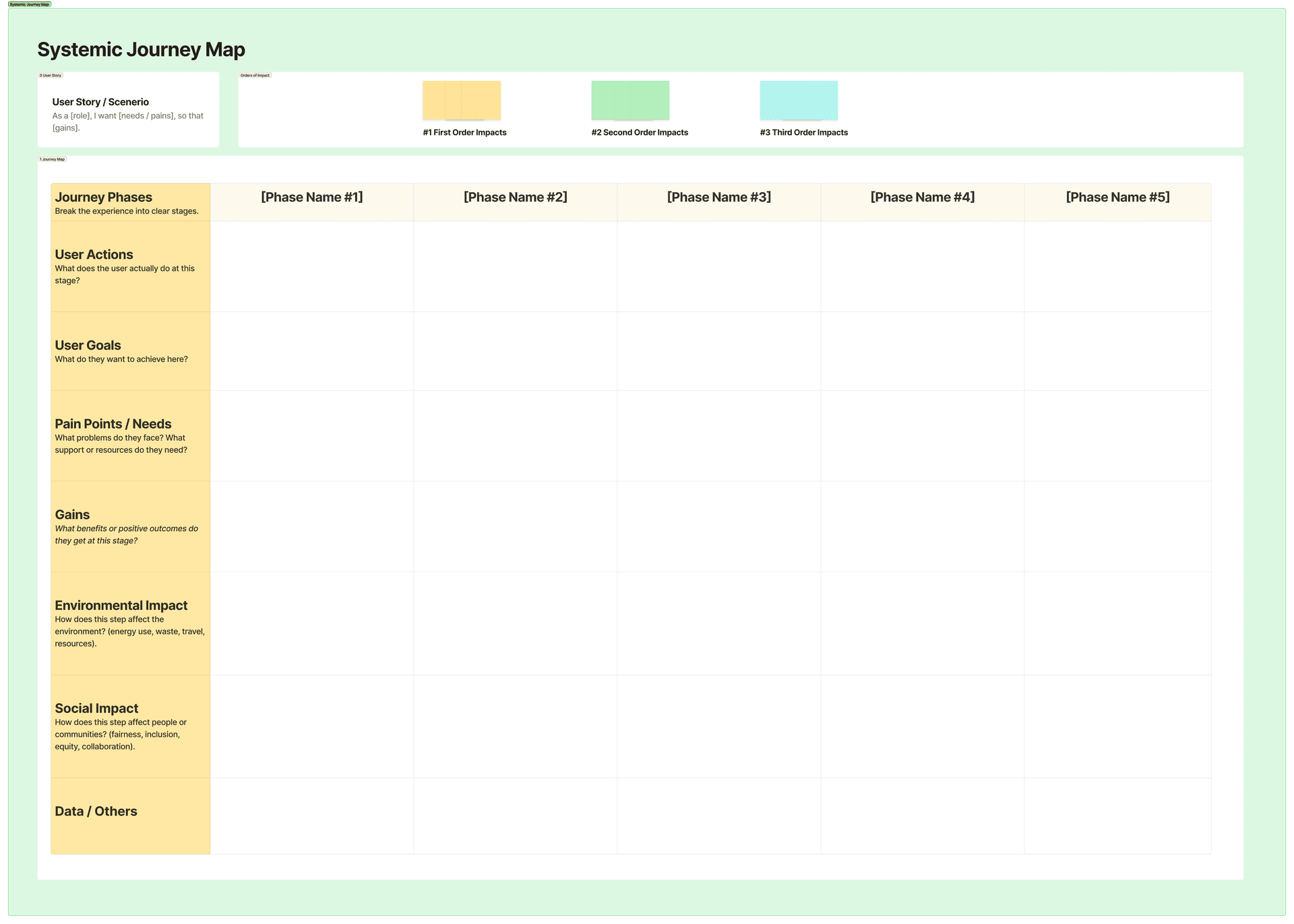
👉 We prepared a ready-to-use template in Figma: Open the Systemic Journey Map Template in Figma.
What the Rows Mean
Journey Phases
The main steps of the experience (e.g., onboarding, everyday use, end-of-life).
User Actions
What people actually do at each step.
User Goals
What they want to achieve.
Pain Points / Needs
What frustrates them.
Gains
What works well or adds value.
Environmental Impact
Energy, bandwidth, device storage, material use.
Social Impact
Inclusion, fairness, safety, accessibility, well-being.
Data / Other Notes
Privacy, governance, or things that don’t fit elsewhere.
You can also classify impacts to see how deep they go:
First order
Direct effects (battery drain, server load).
Second order
Behavioral effects (scrolling longer, changing habits).
Third order
System-level shifts (how an app changes culture or infrastructure).
👉 Don’t stress if you can’t think of third-order effects at first — even spotting first-order impacts is already useful.
Step-by-Step: How to Use It
Step 1 — Define scope
Pick the feature or product you want to map. List the main users and stakeholders.
Step 2 — Map the basic journey
Fill in phases, actions, goals, pains, and gains.
Step 3 — Add environmental and social rows
Brainstorm resource use and social effects for each phase.
Step 4 — Classify impacts
Mark them as first, second, or third order.
Step 5 — Spot opportunities
Highlight where you could reduce harm or add positive impact.
Step 6 — Turn into actions
Write backlog items, requirements, or design changes based on what you found.
👉 The goal isn’t perfection — it’s sparking discussion in your team and making sure sustainability doesn’t get forgotten.
Example: A Short-Form Video App
Let’s say your team is building a short-form video app (like TikTok). Here’s how students might apply the SJM.
Step 1 — Scope and Stakeholders
Scope
Mobile app from install to account deletion.
Primary stakeholders
Viewers, creators, moderators.
Secondary stakeholders
Families, advertisers, cultural groups, network providers, environment.
Step 2 — Core Phases
Install & onboarding
Download, account setup, consent.
Feed consumption
Scrolling, autoplay, reactions.
Creation & upload
Recording, editing, publishing.
Sharing & interaction
Comments, duets, private messages.
Downtime
Breaks, reminders, ending sessions.
End-of-life
Account deletion, data removal.
Step 3 — Environmental & Social Layers
| Phase | Environmental Impact | Social Impact |
|---|---|---|
| Install & onboarding | Network transfer, app updates. | Form accessibility, parental controls, clarity of consent. |
| Feed consumption | Continuous streaming, high-bitrate defaults. | Addictive scrolling, algorithmic bias, missing captions. |
| Creation & upload | Energy for editing and processing. | Harassment risks, barriers for marginalized creators. |
| Sharing & interaction | Extra load from notifications. | Privacy concerns, misinformation, cultural sensitivity. |
| Downtime | Background refresh drains energy. | Sleep disruption, excessive screen time. |
| End-of-life | Cached files and cloud storage. | Hard-to-delete accounts, unclear data removal. |
Step 4 — Impact Orders
First order
Energy use, notifications draining battery.
Second order
Users spend more time due to autoplay; comment culture shifts.
Third order
Attention economy effects, infrastructure demand for video.
Step 5 — Opportunities
Ecological
Adaptive video quality, reduce background refresh, compress cached media.
Social
Auto-enable captions, break reminders, transparent algorithms, stronger safety tools.
Step 6 — Design Actions
Requirement
Respect data-saver mode with adaptive video quality.
Design change
Autoplay pauses after a few videos with a choice to continue.
Accessibility
Auto-generate editable captions.
Transparency
Add a ‘Why am I seeing this?’ button for recommendations.
End-of-life
One-screen account deletion with instant cache removal.
Conclusion
For students, the Systemic Journey Map is a fast, visual tool that connects your app design with bigger questions about people and the planet.
It helps you go beyond “just features” and think about long-term effects — without slowing your team down.
References
Friesinger, E. (2023). Introducing ‘Conscious’ Service Design: Redesigned methods to address environmental and societal issues. Touchpoint, 14(3), 55–60. DOI: 10.30819/touchpoint.14-3.11
Zielińska, M. (2025). Master’s Thesis. Integrating Social and Environmental Sustainability in Software Product Development.